
Installing a mirror dash cam is one of the easiest and smartest upgrades you can make to your vehicle. In this complete installation guide, we'll walk you through everything — from unboxing to hitting the road — so you get crystal-clear footage, front and rear, without any guesswork.
What Is a Mirror Dash Cam?
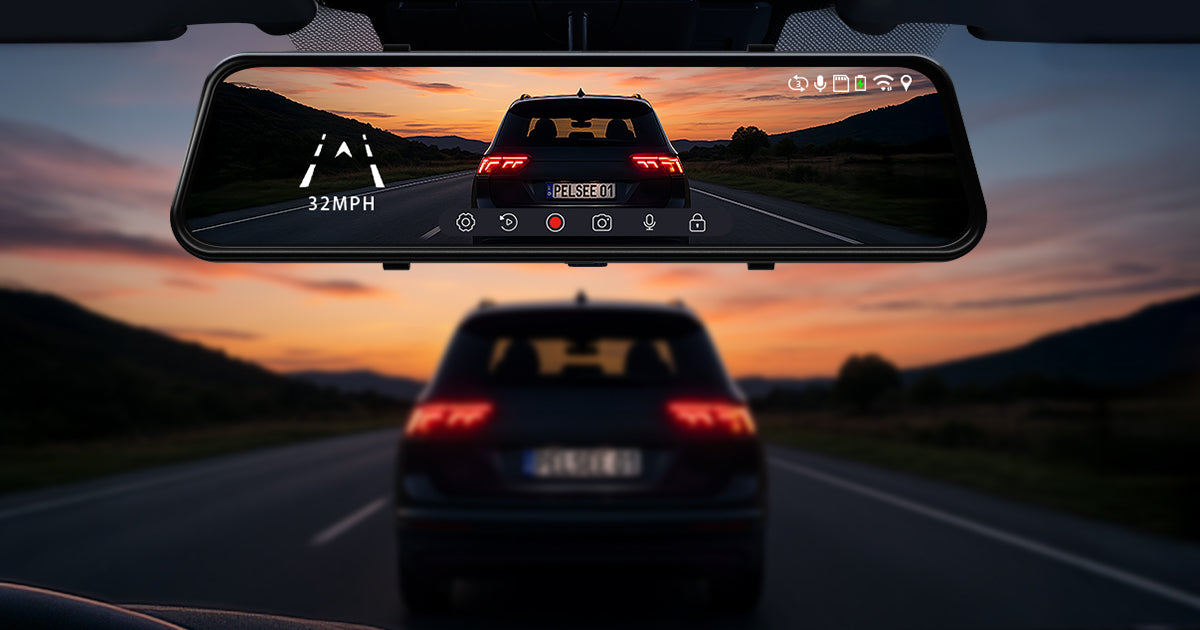
A mirror dash cam — also called a rear view mirror dash cam or smart rearview mirror — is a dual-function device that replaces (or clips over) your factory rearview mirror. It records video footage through a front-facing lens while also displaying a live rear camera feed on its full-touch screen.
Unlike traditional dash cams mounted on your windshield, mirror dash cams offer a wider display, a cleaner install, and a rear view that eliminates blind spots caused by passengers, cargo, or tinted windows.
Why You Need a Mirror Dash Cam
- Continuous loop recording — Captures everything on the road, automatically overwriting old footage.
- Accident evidence — Protects you in insurance claims and legal disputes.
- Rear camera display — Improves reversing safety with a full-screen rear view.
- Night vision — Advanced Starvis seires deliver sharp footage in low-light conditions.
- GPS tracking — Logs your speed and route for added documentation.
- Parking mode — Monitors your vehicle when parked and detects impacts or movement.
What You'll Need Before You Start
| Item | Purpose |
|---|---|
| Mirror Dash Cam (with mounting straps) | Main device |
| Power Cable (12V adapter or hardwire kit) | Power supply |
| MicroSD Card (32GB–256GB, Class 10/U3) | Video storage |
| Rear Camera + Cable (if dual-channel) | Rear view feed |
| Trim Removal / Pry Tool | Routing cables cleanly |
| Zip Ties or Adhesive Cable Clips | Cable management |
| Fuse Tap (for hardwire) | Connect to fuse box |
Step-by-Step Mirror Dash Cam Installation
Lay out all components on a clean surface. Verify you have the main mirror unit, mounting straps or bracket, power cable, rear camera (if included), and any accessories. Read the quick-start card that came in the box.
Locate the MicroSD card slot — usually on the side or bottom edge of the mirror unit. Insert your card firmly until it clicks. Do not skip this step; the dash cam won't record without it.
Open the elastic mounting straps (or slide the bracket onto the mirror arm). Position the mirror dash cam over your OEM rearview mirror. Secure the top and bottom straps tightly — the unit should not wobble. Make sure the front lens is pointed toward the road, not the ceiling.
Sit in the driver's seat. Tilt the mirror/camera up or down so the front lens captures the full width of the road ahead with the horizon roughly in the upper third of the frame. This gives optimal recording coverage.
Run the power cable along the edge of the windshield, tucking it under the headliner trim with a pry tool. Bring the cable down the A-pillar (the trim panel between the windshield and the front door). Tuck excess cable behind the trim to keep the interior tidy.
Plug the power cable into the cigarette lighter / 12V socket for a quick, removable setup. For a permanent, cable-free look, see the Hardwire section below.
Start your vehicle. The mirror dash cam should power on automatically, display the front camera view, and begin recording. Confirm recording by checking that the indicator light or icon is active on screen.
Wiring Options: Cigarette Lighter vs. Hardwire
| Cigarette Lighter Adapter | Hardwire Kit | |
|---|---|---|
| Install Time | 5 minutes | 30–45 minutes |
| Cable Visibility | Visible cord | Hidden, clean look |
| Parking Mode | ❌ Not supported | ✅ Supported |
| Always-On Power | ❌ No | ✅ Yes (via fuse box) |
| Best For | Renters / beginners | Permanent installs |
How to Hardwire a Mirror Dash Cam
- Purchase a hardwire kit compatible with your dash cam (includes a fuse tap, ACC wire, ground wire, and step-down voltage regulator).
- Locate your vehicle's fuse box (usually beneath the dashboard on the driver's side). Consult your owner's manual to identify an ignition-switched fuse (ACC) — this fuse only gets power when the key is on.
- Connect the red ACC wire to the ignition fuse using the fuse tap. This ensures the dash cam turns on with the vehicle.
- Connect the yellow battery wire to a constant-power fuse (for parking mode).
- Attach the black ground wire to a bare metal bolt or grounding point under the dash.
- Route all wires cleanly behind the A-pillar and headliner, securing with zip ties.
How to Install the Rear Camera
Most mirror dash cams include a secondary rear-facing camera for reversing assistance and rear-road recording. Here's how to install it:
- Mount the rear camera above the license plate, on the rear window, or on the trunk lip — wherever gives the best view behind your vehicle.
- Route the rear camera cable through the vehicle's interior. Run it along the side trim panels from the front to the back — tuck it under carpet edges or use the existing cable channels in the trim.
- Connect the cable to the rear camera input port on the main mirror unit.
- Configure the display in the settings menu — choose whether the rear camera shows all the time or only when reversing (triggered by the reverse signal wire).
Where to Mount the Rear Camera
Most drivers choose one of two locations. Pick the one that best suits your vehicle and how you drive.
| Location | Pros | Cons |
|---|---|---|
| Inside the rear window | Easier to install; protected from weather | Window tint can reduce image quality |
| Outside, near the license plate | Unobstructed view; not affected by window tint | More complex installation |
How to Adjust the Camera Angles
Correct alignment makes your footage far more useful as evidence.
Front camera: keep the horizon around the upper third of the frame (as in Step 4), so the road fills most of the picture. Avoid pointing the lens too high toward the sky or too low toward the hood.
Rear camera: make sure the frame covers the traffic behind you, more than one lane if possible, and the road surface.
Initial Setup & Configuration
Once powered on, follow these steps to get your mirror dash cam fully configured:
- Set date and time — Accurate timestamps are important for insurance purposes. If your unit has GPS, time may sync automatically.
- Select video resolution — Choose the highest resolution your SD card and camera support (e.g., 1080P, 1440P, or 4K for front; 1080P for rear).
- Enable loop recording — Set loop segments to 1, 3, or 5 minutes. Old clips are overwritten automatically when the SD card fills up.
- Configure G-sensor sensitivity — The G-sensor locks footage during a collision. Set it to Medium to avoid false triggers on rough roads.
- Enable parking mode (if hardwired) — Choose motion detection or time-lapse recording while parked.
- Adjust screen brightness — Lower brightness at night to avoid reflections in the windshield.
- Format the SD card — Use the in-device format option (not your PC) for the first format to ensure compatibility.
Pro Tips for a Clean, Professional Install
- Use a plastic pry tool (not a screwdriver) to avoid scratching or cracking your interior trim panels.
- Install in a warm environment — cold temperatures make trim plastic brittle and harder to pop off safely.
- Leave a small slack loop of cable near the mirror unit so the camera can be adjusted without straining the cable.
- Use adhesive cable clips along the headliner seam for a professional, invisible cable path.
- Test your SD card by recording for 10 minutes, then reviewing the footage on your phone or PC to confirm everything is working before relying on it for daily use.
- Clean the screen with a microfiber cloth before and after install — fingerprints affect touch sensitivity.
- Update the firmware after installation. Check the manufacturer's website or companion app for the latest firmware version.
Frequently Asked Questions (FAQ)
How long does it take to install a mirror dash cam?
Most installs take 30 to 60 minutes. If you're routing the cable cleanly and hiding it in the trim, allow up to an hour. Hardwiring adds another 20–30 minutes.
Do I need to remove my original rearview mirror?
No. Mirror dash cams are designed to clip or strap over your existing OEM mirror. No drilling or permanent modification is needed. You can remove the dash cam at any time.
What size MicroSD card do I need?
We recommend a High Endurance MicroSD card rated Class 10 / U3, between 64GB and 256GB. At 1080P dual-channel recording, 128GB gives you roughly 8–10 hours of footage before loop-recording kicks in.
Will a mirror dash cam drain my car battery?
When connected via cigarette lighter, the dash cam turns off with your ignition — no battery drain. In hardwire parking mode, the unit monitors battery voltage and shuts down before draining your battery below a safe threshold (typically 11.6V).
Is a mirror dash cam legal?
In most countries (US, UK, Canada, Australia, and most of Europe), using a dash cam is completely legal. Some states/countries have restrictions on what you can mount in the windshield area — the mirror form factor typically avoids this issue since it mounts on the mirror, not the glass.
Can I use a mirror dash cam without the rear camera?
Yes. All mirror dash cams work as a front-only dash cam if you don't connect the rear camera. You can always add the rear camera later.
My mirror dash cam screen is washed out in daylight — is that normal?
The front camera lens may be picking up glare if it's aimed too high. Re-angle the lens downward so it captures the road (not the sky). Also check your screen brightness settings — auto-brightness helps in bright conditions.
Do I need professional installation?
Many drivers install mirror dash cams themselves. Professional installation can help with hardwire setups or exterior rear camera installations.
Can I use Parking Mode without hardwiring?
Most Parking Mode features need constant power from a hardwire kit or an OBD power cable. Some systems also support external battery packs.
Where should I mount the rear camera?
The rear window and the license plate area are the most common locations. See How to Install the Rear Camera above for the pros and cons of each.
Share:
Best Dash Cam for Night Driving and License Plates
Best Dash Cam for Uber Drivers